Standalone XenForo addon

Full XenForo. Modern SPA navigation.

Modern apps don’t reload the whole page on every click — they use SPA navigation. This addon brings that same feel to XenForo: the shell stays, content updates in place, features stay complete — better sessions, continuity, and ads.

~30% pageviews / session & time
2 large live forums tested
script load per session

How traditional XenForo works

Classic XenForo is a multi-page app. Every click — thread, forum, profile, search — triggers a full document request and rebuild.

Traditional

Full page reload on every click

The browser tears down the page, re-downloads HTML, re-parses CSS/JS, and rebuilds the layout from scratch.

  1. 01 User clicks a link
  2. 02 Full HTML response from server
  3. 03 Scripts, styles, and DOM reload
  4. 04 Ad units remount; layout can shift
Click Full reload Blank / rebuild Ads reset
Impact

What that costs

Even on a fast host, the reload cycle adds friction and breaks continuity for both engagement and monetization.

  1. ! Visible white flash / layout jump between pages
  2. ! Page scripts re-initialize on every navigation
  3. ! Ad slots destroy and recreate → missed viewability
  4. ! Session feel is slower; fewer pages per visit

What the SPA is — and how it works with XenForo

SPA (single-page application) is how modern web apps navigate — Discord, Notion, most dashboards: click, content swaps, no full document reload. This standalone XenForo addon adds that same navigation model to forums. Same features, same admin, same templates — XenForo, with a modern app feel.

  • Modern app-style navigation. Instant route changes instead of classic full-page XenForo reloads.
  • Standalone addon. Installs on existing boards without replacing the XenForo core.
  • Full feature set preserved. Threads, forums, profiles, search, permissions — all XenForo, just faster to move through.
  • Battle-tested at scale. Validated with moderators and members on two large live forums under real traffic.
Shell stays Fetch route Swap content Ads persist No full reload

How it helps users, sites, and ads

Faster navigation compounds into more pageviews per session and deeper visits. Persistent chrome and ad units compound into cleaner monetization.

Instant page switches

Same navigation pattern as modern SPA apps — XenForo feels current instead of a chain of full reloads.

More pages per session

Less wait between clicks means more browsing — higher pageviews per session and longer time on site (~30% lift).

Scripts load once

Page scripts initialize for the session instead of on every navigation — less CPU, fewer race conditions, cleaner timing.

Persistent ad units

If your current tags work with SPA navigation, keep them as-is. If not, we coordinate with your ad provider for SPA-friendly support.

Better viewability

Stable layout and continuous units improve viewability and reduce CLS-style breaks when users move between pages.

Session continuity

Header, sidebars, and chrome stay put. Users stay in flow — and so do measurement and ad delivery contexts.
~30%
Lift in pageviews per session and session time Observed on live XenForo traffic after enabling the SPA layer — driven by faster, continuous navigation.

Live demos

Both sites run the SPA layer in production. Click around forums and threads — navigation should feel like a modern app.

NikeTalk

Primary live demo. Browse forums and threads for instant SPA switches.

  1. Go to niketalk.com
  2. Browse forums, threads, and member pages
  3. Notice content updates without full reloads

Note: the top news widget links out to a news subdomain — those links are excluded from SPA (normal full load).

Open NikeTalk →

VS Battles

Second live demo on a large XenForo community — same SPA navigation behavior.

  1. Go to vsbattles.com
  2. Click through forums and threads
  3. Same instant, no-reload feel as NikeTalk
Open VS Battles →

Compare traditional on NikeTalk only

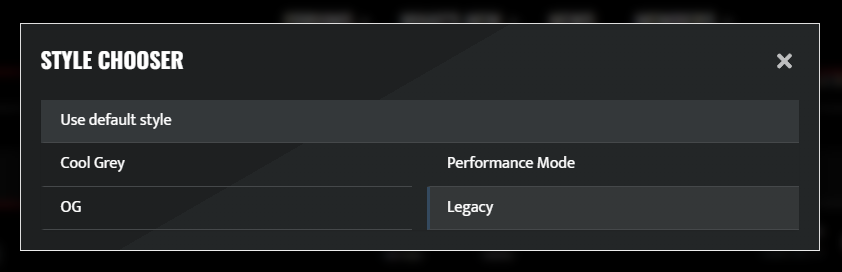
Want the old full-reload feel? On niketalk.com, use the footer Style Chooser and pick Legacy. (Style Chooser comparison is NikeTalk-only.)

  1. Scroll to the footer on NikeTalk
  2. Open Style Chooser
  3. Select the Legacy theme
  4. Click around — each navigation fully reloads
  5. Switch back via Style Chooser → default / SPA style
NikeTalk footer Style Chooser highlighting the Legacy theme option

What a test setup looks like

Lightweight and reversible — including admin-only trials before you roll out wider.

On your board

Install & compare

  1. 01 Install the SPA addon on one XenForo site (or staging)
  2. 02 Optionally enable SPA for a specific style only — e.g. admins only for testing
  3. 03 Keep existing ad tags if they work with SPA; otherwise we ask your provider for SPA support
  4. 04 Review session, pageview, and ad metrics after a short window
What you get

Clear signal, low risk

  1. 01 Same XenForo content — only navigation mode changes
  2. 02 Easy rollback: disable the addon or limit it to a test style
  3. 03 Optional quick contact or chat to walk through findings
  4. 04 Or start on NikeTalk / VS Battles — no install needed to feel the difference

Common questions

Quick answers for teams evaluating SPA navigation on XenForo.

What is XenForo SPA?

A standalone addon that brings modern single-page application navigation to XenForo. After the first load, clicking around swaps content without a full document reload — same features, modern app feel.

Where can I see a live demo?

Try it on niketalk.com and vsbattles.com. On NikeTalk only, use the footer Style Chooser and select Legacy to compare traditional full-page reloads.

How does it help ads and sessions?

Faster navigation increases pageviews per session and session time (~30% lift observed). Ad units can persist across route changes. Existing tags stay if they work with SPA; otherwise we coordinate SPA support with your provider.

What does a test setup look like?

Install on one board or staging. Optionally enable SPA for a specific style (e.g. admins only). Review metrics, then roll back easily by disabling the addon or limiting it to a test style.

Ready when you are

Try the live demos, then we can set up a test on one of your XenForo boards — or reach out for a quick contact or chat.